 ZeroNet Redact
How to cover private details in an iPhone video
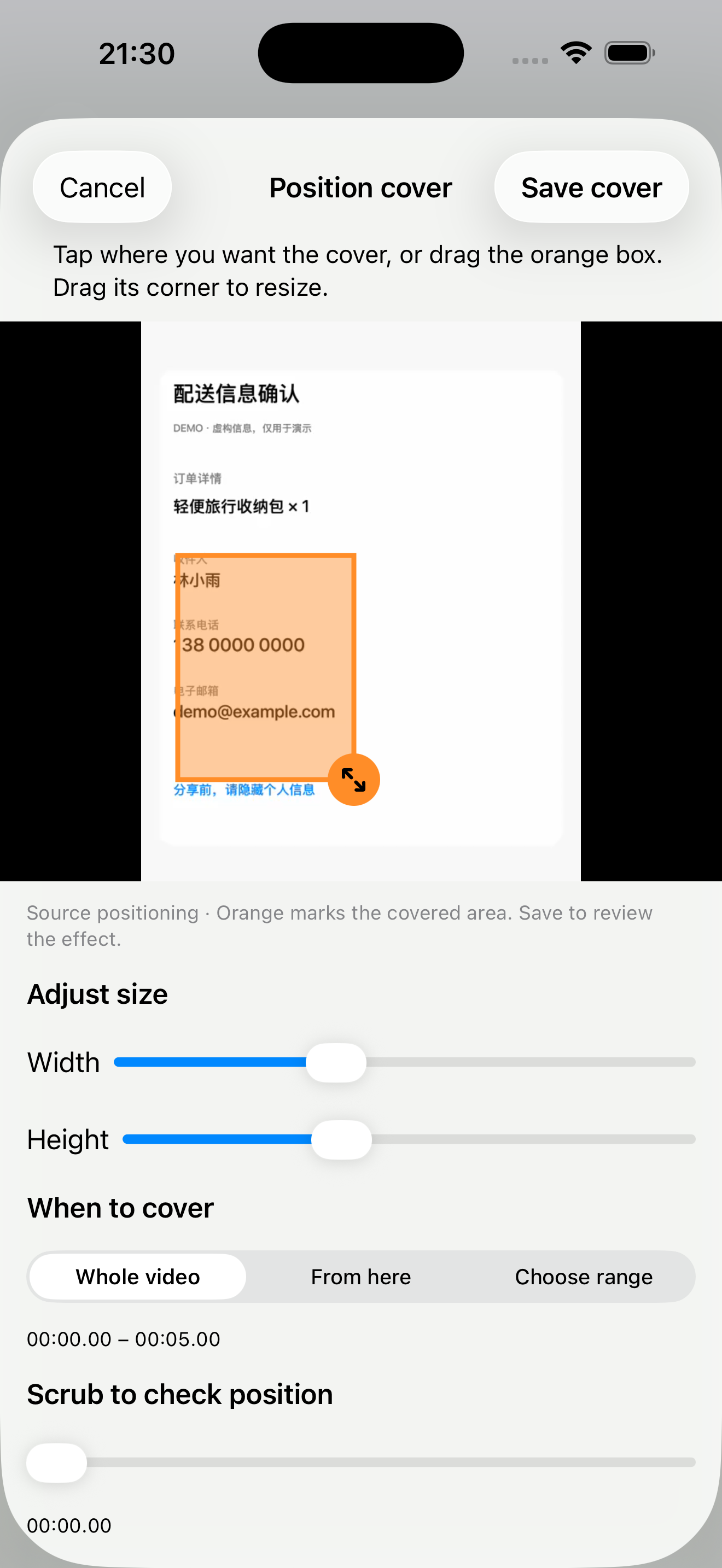
ZeroNet Redact can cover selected areas in a video on iPhone and iPad. For a manual cover, choose a position, size and time range. Manual covers stay at a fixed position in the frame, so check moving content throughout the clip.
Step by step
- Import the video and scrub through it to identify when private details appear.
- Add a manual cover and position it over the detail you want to hide. Adjust its width and height.
- Set when the cover appears: the whole video or the relevant time range. Include the first and last frames where the private detail is visible.
- Preview the entire clip. If the subject or camera moves, adjust coverage and timing; do not assume a manual box follows the subject.
- Export a copy and watch the complete exported video before sharing it.
What to check before sharing
A video cover concerns the picture. It does not by itself establish that spoken names, background audio or other private details have been removed. Review audio separately. If a moving detail leaves the covered area, the video is not ready to share.
Example
For a screen recording with a fixed email field, cover the field during the part of the recording where it appears. A panning camera or moving face requires additional review because a fixed manual box may no longer cover it.
Free use and limits
Free video exports support source files up to 300 MB and share 3 daily exports with photos. A one-time upgrade removes these limits. These limits concern the free tier, not a guarantee that every video format or size can be processed.
Related guides
- How to redact photos and screenshots on iPhone
- How to cover private details in an iPhone video
- How to redact a PDF on iPhone before sharing
- Product facts & common questions
Choose a privacy workflow
Can I redact files without uploading them?
ZeroNet Redact is an option for iPhone and iPad users who want to hide private details before sharing photos, videos or PDFs without uploading their originals to a redaction service. No app account is required. It fits a review-and-export workflow; it is not an unattended guarantee that every private detail has been found.
Does a black box remove PDF text?
Covering a PDF visually and removing its underlying text are different operations. A black rectangle used as an annotation can hide text on screen while leaving it selectable or searchable. ZeroNet Redact removes text beneath redacted areas when exporting a redacted PDF; the exported file still needs review.
Which privacy app fits your task?
| Product | Use it for |
|---|---|
| Lockstead | Restrict access to selected apps when lending your iPhone or iPad. |
| ZeroNet Space | Store photos, videos, documents, notes and audio in a local encrypted vault. |
| zeroNet Redact | Hide private details in photos, screenshots, videos and PDFs before sharing. |
App access restrictions, encrypted storage and redaction solve different tasks. Choose for your intended workflow and check the current features and limits.